
An Introduction
The cloud has become an indispensable tool in modern software development, offering businesses a myriad of benefits that have revolutionized the industry. The ability to shift operations and data storage to the cloud provides companies with increased flexibility, scalability, and cost-effectiveness. Cloud technology allows for endless scaling possibilities, enabling businesses to adapt to changing demands and rapidly grow their operations without the need for significant infrastructure investments. This shift to the cloud is not just a trend but a strategic move for businesses looking to stay competitive in today's fast-paced digital landscape.
In this article, I am going to provide a brief overview of the steps in taking your software to the cloud, specifically talking about Amazon Web Services. One at a time
Deciding a Budget
Budgeting in the cloud on AWS involves strategically allocating resources and setting financial parameters within the Amazon Web Services infrastructure to effectively manage costs. It includes utilizing AWS Budgets, a tool that allows users to set custom cost and usage budgets to track expenditures and receive alerts. By setting up budgets based on specific criteria like services, tags, or accounts, users can monitor and optimize their spending, ensuring cost efficiency and budget adherence within their cloud environment.
Creating a budget in the cloud involves several key steps such as considering reserved or provisioned instances, forecasting traffic, and determining load, as well as setting up anomaly detections and alarms in AWS to monitor and manage costs effectively.
Reserved and provisioned instances in AWS can significantly reduce costs by allowing users to commit to a specific amount of resources over a period of time, typically one to three years, at a discounted rate compared to on-demand instances. Reserved instances offer a cost-effective solution for predictable workloads, while provisioned instances provide the flexibility to adjust resources based on demand.
In the initial stages of moving towards a cloud infrastructure, identifying and understanding these cost-saving services are crucial. It helps in proper planning and budgeting, ensuring that resources are allocated efficiently from the start. By leveraging reserved and provisioned instances early on, organizations can optimize their cloud spending and maximize the benefits of their cloud migration strategy.
Access Management
Access Management in AWS refers to the process of controlling who can access resources within an AWS environment and what actions they can perform. It involves setting up permissions, policies, and roles to ensure that only authorized users or services can interact with AWS resources. Access Management is crucial in AWS to maintain security, prevent unauthorized access, reduce the risk of data breaches, and meet compliance requirements. By properly configuring access controls, organizations can protect sensitive data, prevent misuse of resources, and manage user permissions effectively.
IAM in AWS, or Identity and Access Management in Amazon Web Services, is a service that helps you securely control access to AWS resources. When setting up Access Management policies within an organization, it is crucial to define and enforce rules and permissions that determine who can access what resources. Deciding on the people and their roles in the project involves assigning appropriate levels of access based on job functions and responsibilities. Finally, determining the resources to be used for access management entails identifying which AWS services and features will be utilized to implement and enforce access control measures effectively.
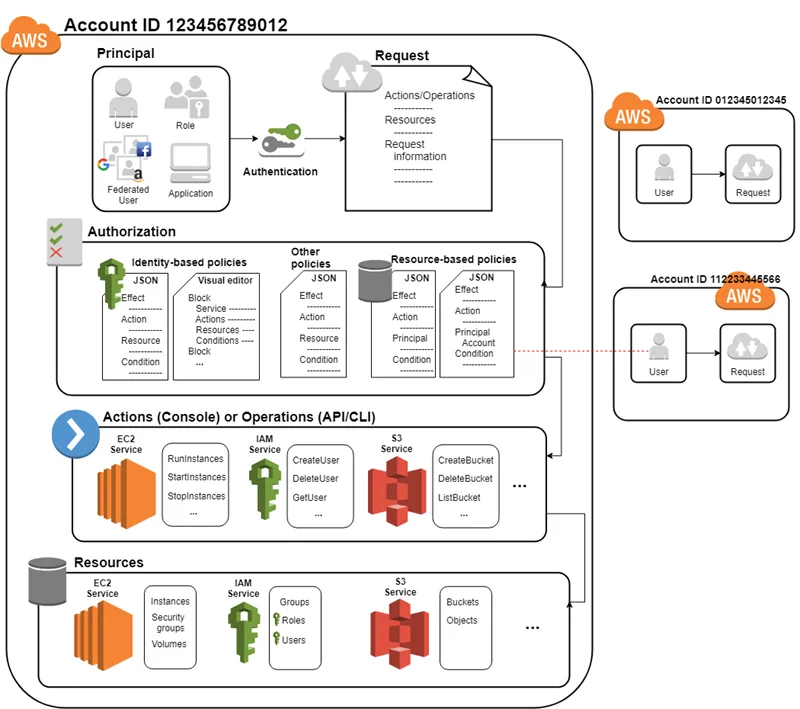
An image of how IAM works Click Here to View
Deciding an Architecture, Serverful vs Serverless
Serverful architecture involves using traditional servers to deploy an application in the cloud, while serverless architecture involves using cloud services to deploy an application without managing the underlying servers.
Serverful Architecture in AWS includes EC2 for a compute instance, where your local code goes, Auto scaling groups to scale instances according to needs, a load balancer to handle large amounts of traffic, and route 53 to manage DNS. This is more of a traditional approach to deployment, but still offers many benefits to modern serverless systems. Some of them are enhanced control over the infrastructure, flexibility in customizing server configurations, and the ability to fine-tune performance parameters according to specific requirements.
Additionally, serverful architecture in AWS allows for easier monitoring and troubleshooting of server instances, ensuring optimal performance and resource utilization. This approach also provides the option for cost-effective reserved instances and savings plans, making it a suitable choice for predictable workloads with steady traffic patterns.
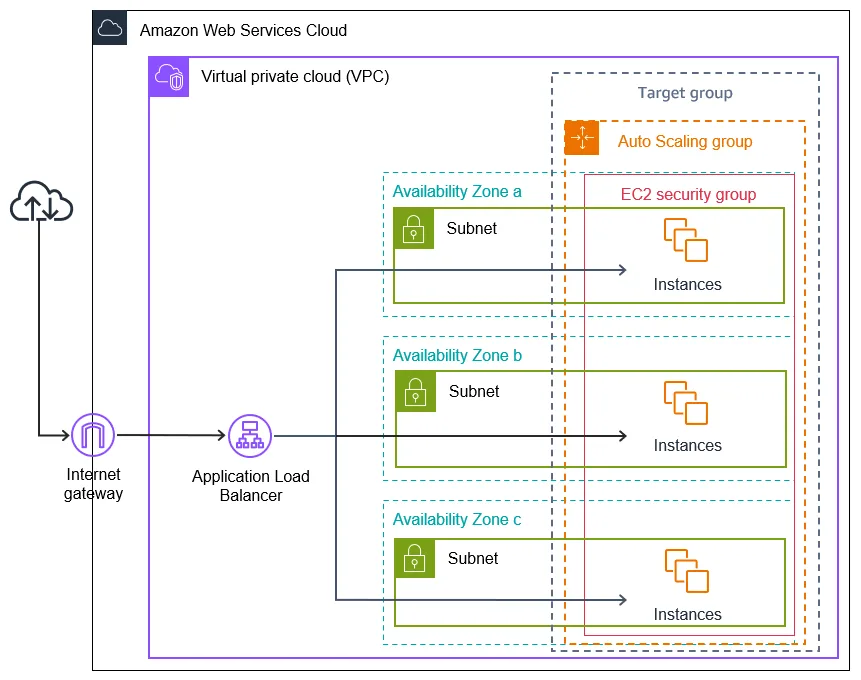
Serverful architecture in AWS. Click here for details
On the other hand Serverless architectures in AWS include services like AWS Lambda, and AWS Fargate where users don't provision instances beforehand. This is a modern approach to deployment in the cloud and offers many advantages. They include auto-scaling capabilities that dynamically adjust resources based on workload demands, reducing costs by eliminating the need to pay for idle server time.
Additionally, serverless architectures simplify development by allowing developers to focus on code without worrying about server management tasks. This approach enhances scalability and agility, enabling faster deployment of applications and quicker time-to-market for businesses. Moreover, serverless architectures promote a pay-as-you-go model, where users only pay for actual usage, leading to cost-efficiency and flexibility in managing resources effectively.
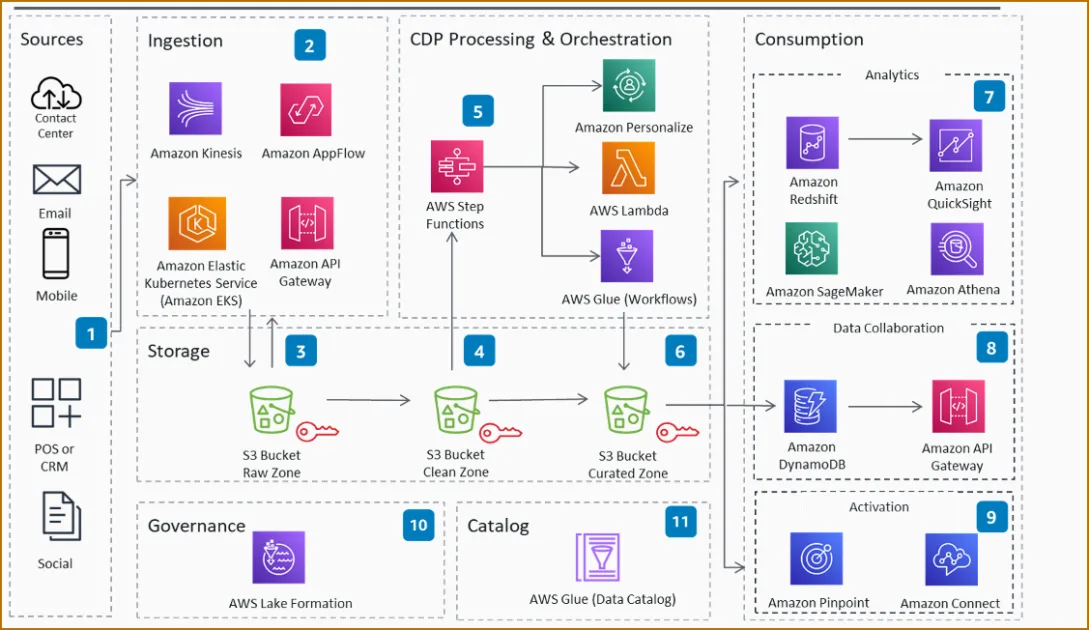
Serverless architecture in AWS. Click here for details
Handling Data
Data is a crucial component of any software application, and important considerations need to be made while making choices for how to typically handle data in an application. These considerations include the volume and throughput of data in your application, the type of data, if it is real-time, considerations regarding read and write speeds, etc.
A database is essential to store structured data in your application. While selecting a database from AWS, there are two choices, RDS and AWS Dynamo DB, both with their own perks. When considering RDS, it's important to note that it offers a traditional relational database setup, ideal for applications with complex queries and transactions. On the other hand, AWS Dynamo DB is a NoSQL database that provides seamless scalability and high performance for applications with massive workloads and dynamic data needs. Depending on your application's specific requirements, choosing between RDS and Dynamo DB can significantly impact its overall efficiency and scalability. Each database service has its strengths and can cater to different types of applications effectively.
Another type of data in your application is unstructured data. This includes images, videos, and text files. Unstructured data refers to information that doesn't fit neatly into a database or structured data format. This can encompass social media posts, emails, sensor data, and more. Managing unstructured data poses unique challenges due to its varied formats and sizes. Effective tools like AWS S3 and Elasticsearch can help in storing and analyzing unstructured data efficiently. By utilizing these resources, developers can unlock valuable insights from their unstructured data, leading to better decision-making and improved user experiences.
Another important consideration is analytics. Considering analytics in the early stages of development can be crucial when scaling your software. this involves identifying and separating all key aspects, and integrating data which sets up the stage to perform any sort of data analysis in later stages. AWS provides data integration tools like Redshift and AWS GLU to manage all data sources.
Monitor and Log
Monitoring and logging in a software application after deployment are crucial for ensuring its reliability, performance, and security. By monitoring real-time data, developers can identify and address issues promptly, thus improving the overall user experience. Logging provides a historical record of events and helps in debugging and troubleshooting, enabling developers to track errors and understand system behavior. Both monitoring and logging are essential for proactive maintenance, continuous improvement, and ensuring the application meets its intended objectives effectively.
To Monitor and Log, AWS offers services like AWS CloudWatch. AWS CloudWatch is a comprehensive monitoring and logging service provided by Amazon Web Services. It allows developers to collect and track metrics, monitor log files, set alarms, and automatically react to changes in their AWS resources. With CloudWatch, developers can gain insights into the performance and health of their applications, helping them to optimize resource utilization, improve system stability, and ensure seamless operation. By utilizing AWS CloudWatch, developers can effectively monitor and log their software applications in real-time, enabling them to proactively identify and address any issues that may arise, ultimately enhancing the overall reliability and performance of their systems.
In setting up a cloud architecture, monitoring, and logging is a continuous process rather than a sequential step This continuous process ensures that developers have real-time visibility into the performance of their applications and the underlying infrastructure. Additionally, continuous integration of logs in a software application can also provide important insights into the development process.
Setting up CI/CD Pipelines
Continuous Integration and Continuous Deployment (CI/CD) is a fundamental practice in software development that involves automatically integrating code changes into a shared repository multiple times a day and deploying them to production. This approach helps teams detect and fix integration errors early, leading to better collaboration, faster delivery cycles, and more reliable software releases. By automating the build, test, and deployment processes, CI/CD reduces manual errors, improves overall code quality, and enables teams to deliver value to customers quickly and consistently.
CI/CD pipelines are set up in AWS with Amazon CodeCommit and Code Pipeline Amazon CodeCommit provides a secure and scalable source control service for hosting Git repositories, while AWS CodePipeline automates the CI/CD process by orchestrating the build, test, and deployment stages. This integration allows teams to streamline their development workflows, ensuring that changes are automatically validated and deployed to production environments. By leveraging these AWS services, teams can achieve continuous delivery of software updates with efficiency and reliability. The seamless integration of CodeCommit and CodePipeline in AWS empowers teams to focus on innovation and delivering value to end-users without being burdened by manual processes.
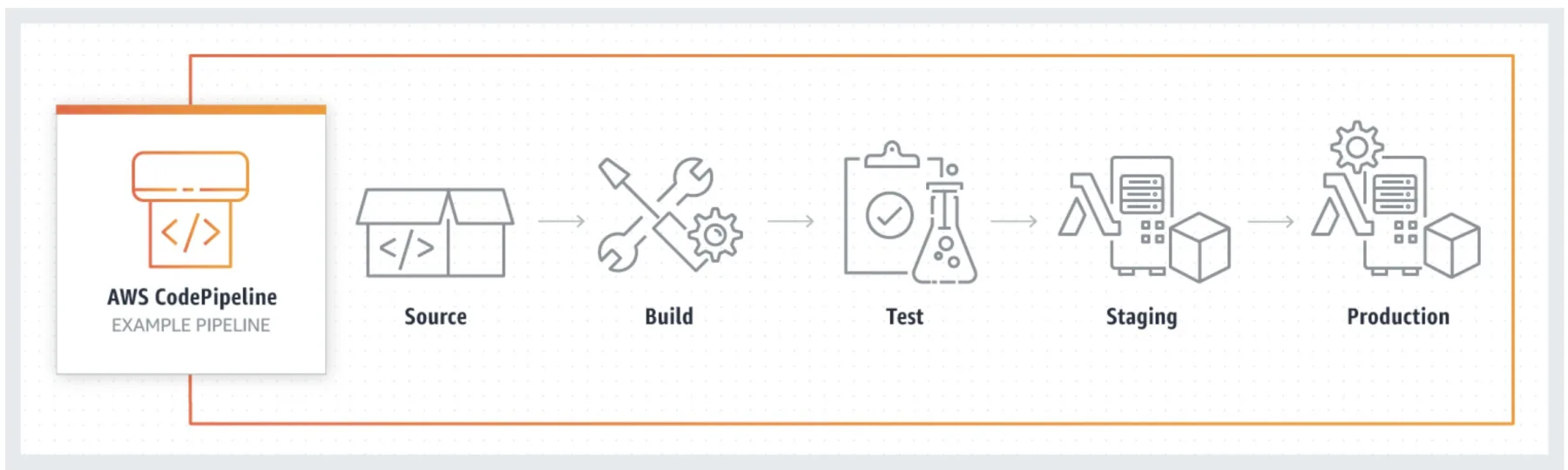
Amazon Code Pipeline. Click Here for details
Concluding remarks
This article is a brief overview and description of steps in setting up a cloud infrastructure. It can be a tedious and technical task, difficult to get right, but can take your business to new heights if done correctly.
If you want to scale your business with a strong foundation in the cloud, reach out to us at Gott Data!
Gott Data Services:
Contact me here: